
Open data MCP server for German cities
The InfraNode MCP server is a free, hosted Model Context Protocol server that
gives AI agents access to 82 data types of open data for 84 major German
cities through 12 lean tools, with no API key. It exposes the city data as
tools an agent calls directly, so you do not write HTTP calls by hand. The
server is listed in the official
MCP Registry
under the name dev.infranode/infranode, with a tool overview and
score also on Glama.
In short: InfraNode is the open data MCP server for Germany, a free, keyless MCP server for German cities and their open data, usable in Claude, ChatGPT and other AI agents.
What sets it apart: InfraNode is the most comprehensive open data MCP server for Germany. It is not limited to a single city or to rail only, but covers all 84 major German cities and every data type, from environment and mobility to energy, economy and city life, through one hosted, keyless endpoint, with no per-city signup and no local install. How InfraNode compares to other MCP servers for German and European data is shown in the MCP server comparison.
City names are lenient, you don't need the exact slug
City names are resolved leniently. Write the German name with or without
umlauts, casing does not matter, and common English exonyms and short forms
work too: München, münchen, munich and
munchen all resolve to muenchen, cologne
to koeln, frankfurt to frankfurt-am-main.
If a name is not recognized you get a 404 whose hint suggests the closest slug
(“Meintest du …?"). The list_cities tool returns the canonical
slugs at any time.
Data tools by topic
Dedicated pages per data type explain the matching MCP tool and how to use it in your AI assistant:
- EV charging MCP server for German cities
- Car park MCP server for German cities
- Weather warning MCP server for German cities (DWD)
- Solar MCP server for German cities (PVGIS)
- Solar cadastre MCP server for German cities
- Public procurement MCP server for German cities
- Council information MCP server for German cities
- Weather MCP server for German cities (DWD)
- Air quality MCP server for German cities (UBA)
- Electricity price MCP server for Germany (SMARD)
- Land values MCP server for German cities (BORIS)
- Public transport MCP server for German cities
This data is available for all 84 covered cities. New to MCP? What is an MCP server covers the basics, the setup guide shows how to connect it in Claude and ChatGPT.
Connect now
The server is publicly hosted at https://mcp.infranode.dev/mcp
(Streamable HTTP). No install, no API key: add it as a connector with that
URL in Claude, ChatGPT or any other MCP client and you are done.
Building a Custom GPT instead of an MCP setup? For the OpenAI ecosystem InfraNode is also available as a GPT action with a curated OpenAPI.
Try it now: have it build a live dashboard
In clients with canvas/artifact support (e.g. Claude Code, Claude.ai), a simple prompt is enough to turn InfraNode data into a finished, interactive page. For example:
Build me a live dashboard for Cologne
The agent calls get_city_overview plus a few targeted live data
types (weather, air quality, train departures, traffic events via
get_city_resource) and renders a full overview page from that
on its own, InfraNode itself never prescribes any UI:
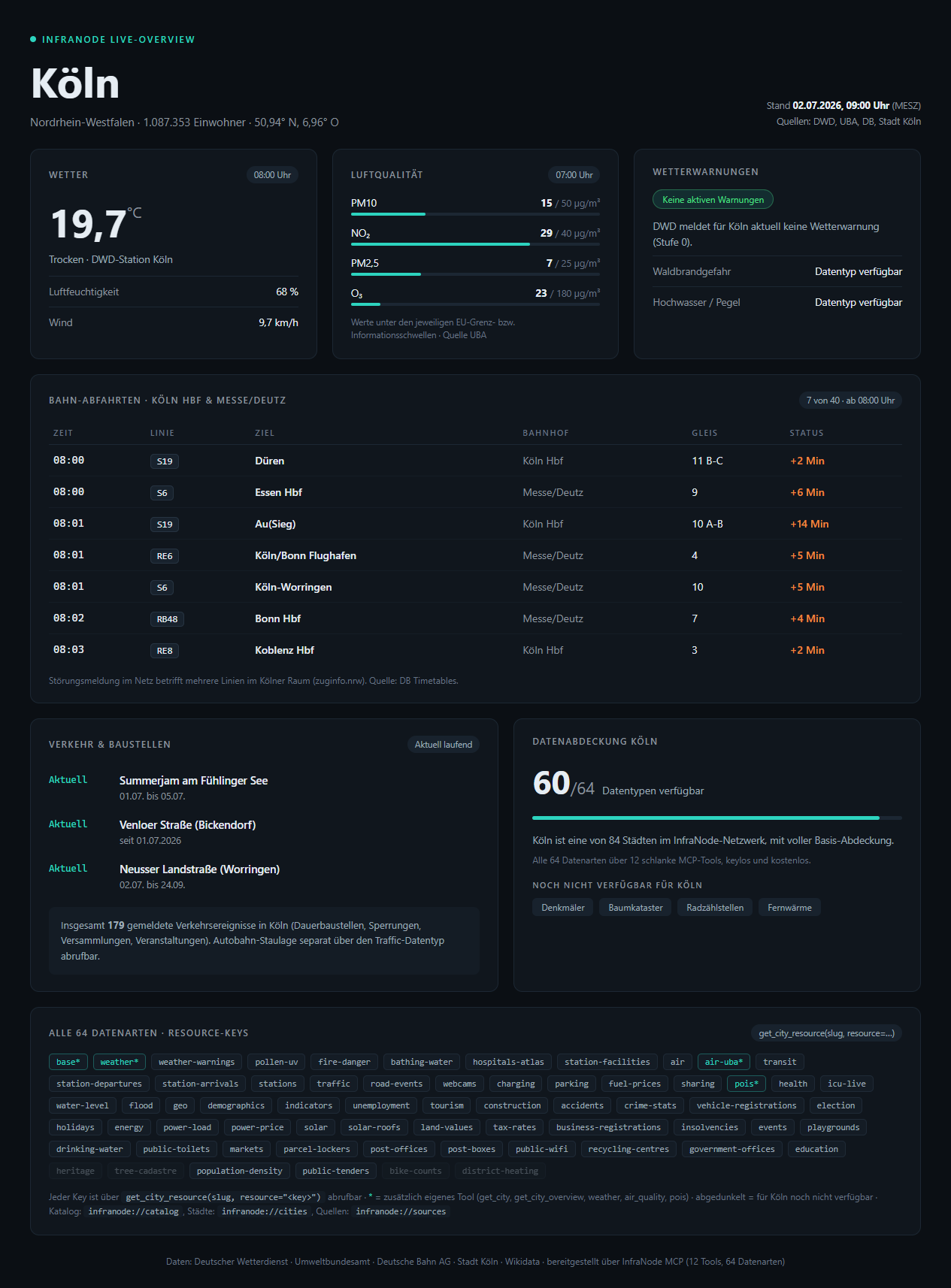
The result isn't an InfraNode app, it's something the agent built itself
from the tools' raw JSON responses, starting from
get_city_overview. Works the same way for any of the other 83
cities.
What the server runs against
The MCP server is a thin wrapper around the InfraNode live API. Each tool calls the REST API and passes its normalised JSON through unchanged. There is no mapping logic in the server and no API key for read access.
The 12 tools
The server provides 12 lean tools that together cover 82 data types. This keeps the token footprint in the agent's context window minimal, stays well below the tool limits of common MCP clients (e.g. 80 tools in Cursor), and the data breadth keeps growing without adding new tools.
Why 12 tools instead of 71? (July 2026 change): Until June
2026 every data type carried its own tool, 71 in total. That tool list cost
roughly 30,000 tokens in the context window of every connected agent, on
every single connect, and would have kept growing with each new data type.
Since July 2026 get_city_resource bundles the entire long
tail: same data, same responses, but only about 4,400 tokens for the whole
tool list (85 percent less) and permanent headroom under all client tool
limits. For existing users: if you previously called an individual tool
such as charging or parking, call
get_city_resource(slug, resource="charging") instead; the key
is the former tool name in kebab case (for example water_level
becomes water-level). The REST API is unaffected by this
change.
| Tool | Description |
|---|---|
get_city(slug) | City master data (population, area, coordinates) |
get_city_overview(slug) | One-call overview: catalog of all 82 data types with key and coverage status + live highlights (discovery entry point) |
get_city_resource(slug, resource) | Generic access to all 82 data types by data type key (see list below) |
air_quality(slug) | Official air quality: PM10, PM2.5, NO2, O3, SO2 (UBA) |
weather(slug) | Current weather observations (DWD, not a forecast) |
pois(slug, type) | Points of interest, filtered by type (OpenStreetMap) |
station_board_departures(eva) | Live departures of any station by EVA number, all categories incl. local trains + disruptions (DB Timetables) |
station_board_arrivals(eva) | Live arrivals of any station by EVA number, all categories incl. local trains + disruptions (DB Timetables) |
transit_departures(slug, stop_id?) | Live public-transport departures with delays (GTFS-RT/HVV/VGN; Berlin prefers VBB CC-BY 4.0) |
list_cities() | List of all covered cities (slugs, coverage) |
sources() | All data sources with licence and availability |
compare(resource, cities) | Compare one resource (weather, air, indicators, demographics, unemployment, tourism, charging-status, weather-warnings) across several cities |
Most tools expect a city slug (for example berlin or
hamburg); pois also requires a type
parameter (e.g. hospital, school,
pharmacy), and transit_departures optionally takes
a stop_id. list_cities and sources
need no argument.
The 82 data types
Any data type without a dedicated tool is fetched via
get_city_resource, passing the data type key as the
resource argument. Example:
get_city_resource(slug="berlin", resource="charging") returns
the charging stations in Berlin. Which keys a city covers is shown by
get_city_overview(slug) (key plus coverage status per data
type); the infranode://catalog resource lists all data types.
Core and geo
| Data type | Description |
|---|---|
base | City master data. Dedicated tool: get_city |
overview | One-call overview: catalog of all data types per city with coverage status + live highlights (discovery entry point). Dedicated tool: get_city_overview |
geo | Geo data |
demographics | Demographics |
population-density | Population density from the official Census 2022 100m grid (inhabitants per km² over the populated area) |
Environment and weather
| Data type | Description |
|---|---|
air-uba | Official air quality. Dedicated tool: air_quality |
air | Air quality, live readings |
weather | Weather. Dedicated tool: weather |
weather-warnings | Official DWD weather warnings (severe weather, level) |
civil-protection-warnings | Official civil protection warnings (BBK NINA: hazmat, major fire, etc.) |
pollen-uv | Pollen and UV index |
fire-danger | Forest and grassland fire danger index (DWD) |
Mobility and traffic
| Data type | Description |
|---|---|
traffic | Traffic situation |
transit | Public transit stops |
charging | Charging stations |
charging-status | EV charging occupancy (live, all 84 cities) |
road-events | Road and construction notices |
parking | Live parking occupancy per city: vacant spaces and occupancy (Dortmund, Frankfurt am Main, Wuppertal) |
parking-onstreet | On-street parking per city: spaces and parking rule per street section, parking management areas, accessible bays, loading zones (Munich only) |
park-and-ride | Park & ride and bike & ride facilities per city: spaces, prices, transit access and occupancy forecast (Munich only) |
mobility-points | Mobility points and car-sharing parking areas per city (Munich only) |
bike-parking | Bike parking facilities per city: in-service stock, spaces, construction type, covering, bike-and-ride (Munich only) |
vehicle-registrations | Car stock and electric vehicle share (KBA) |
accidents | Road traffic accidents per county (accident atlas) |
crime-stats | Crime statistics per main offence group: cases, frequency per 100k, clearance rate (BKA PKS) |
fuel-prices | Fuel prices per city, aggregated (Tankerkönig) |
sharing | Bike and scooter sharing per city, aggregated (GBFS) |
bike-counts | Bike counters per city: municipal continuous cycling-count stations (municipal open data, partial coverage) |
station-departures | Live departures at each city's main station with delays (DB Timetables) |
station-arrivals | Live arrivals at each city's main station with delays (DB Timetables) |
stations | Catalog of all stations in a city with EVA numbers (DB StaDa) |
station-facilities | Station facilities: lift and escalator status (DB FaSta, partial coverage) |
Water and situation
| Data type | Description |
|---|---|
water-level | Water levels |
flood | Flood situation |
bathing-water | Bathing water quality nearby (EEA) |
Health and energy
| Data type | Description |
|---|---|
health | Health data |
hospitals-atlas | Hospital locations from the federal clinic atlas |
energy | Energy installations (market master data register) |
power-load | Electricity consumption / grid load per control zone (SMARD) |
power-price | Day-ahead wholesale power price (SMARD) |
solar | Solar irradiation and normalised PV yield per kWp (PVGIS) |
solar-roofs | Rooftop solar cadastre per city: solar potential of roofs (partial coverage) |
district-heating | District heating networks (municipal heat planning, partial coverage) |
Economy and statistics
| Data type | Description |
|---|---|
unemployment | Unemployment count and rate per county |
tourism | Guest overnight stays and arrivals (tourism) |
construction | Building permits (residential buildings and dwellings) |
indicators | Socioeconomic indicators per county (INKAR/BBSR, ~70 metrics) |
sustainability | Sustainability and SDG indicators per municipality as a time series from 2006 to 2023 (Wegweiser Kommune, Bertelsmann Stiftung, CC0) |
population-structure | Age structure per city as a time series: count and share per age group, by gender and generation, actuals from 2006 and forecast to 2040 (Wegweiser Kommune, CC0) |
population-trend | Population trend as a time series: change in age groups, birth and death rates, migration balance (Wegweiser Kommune, CC0) |
municipal-finance | Municipal finances as a time series: tax multipliers, tax capacity, debt, investment, social spending (Wegweiser Kommune, CC0) |
labour-market | Labour market and commuters as a time series: unemployment and employment rates, in- and out-commuters (Wegweiser Kommune, CC0) |
integration | Integration as a time series: population shares, employment, education, naturalisations (Wegweiser Kommune, CC0) |
childcare | Childcare as a time series: care rates by age, type of care and hours, 83 cities (Wegweiser Kommune, CC0) |
education-stats | Education statistics as a time series: school qualifications, apprentices, further education, 70 cities (Wegweiser Kommune, CC0) |
social-situation | Social situation as a time series: SGB II rates, old-age poverty, basic income support, over-indebtedness (Wegweiser Kommune, CC0) |
care | Long-term care as a time series: people in need of care, care rate, outpatient and inpatient, forecast to 2030, 73 cities (Wegweiser, CC0) |
land-values | Official land values per city, aggregated (BORIS, building land) |
tax-rates | Local tax multipliers per municipality: trade tax and property tax A/B/C (Regionalstatistik) |
business-registrations | Business registrations/deregistrations and net per district (Regionalstatistik) |
insolvencies | Insolvency filings per district: corporate and other debtors (incl. consumers), annual (Regionalstatistik) |
public-tenders | Public procurement per city: running tenders and awarded contracts (German public procurement data service, OCDS/CC0) |
City life and politics
| Data type | Description |
|---|---|
pois | Points of interest (required type parameter, e.g. hospital). Dedicated tool: pois |
events | Events |
webcams | Webcams |
election | Election results |
holidays | Public holidays |
heritage | Listed heritage monuments per city from the state register (Berlin, DL-DE/Zero) |
office-wait-times | Government office wait times per city: live wait at citizen/vehicle-registration offices (Cologne only, partial coverage) |
council-papers | Council information per city: council papers, motions and resolutions from the council information systems (OParl; Dresden, Cologne, Düsseldorf, Münster, Leipzig) |
City infrastructure (OpenStreetMap)
| Data type | Description |
|---|---|
playgrounds | Public playgrounds |
drinking-water | Public drinking water fountains |
public-toilets | Public toilets |
markets | Markets and marketplaces (optional market days) |
parcel-lockers | Parcel lockers (DHL, Amazon, DPD, Hermes, GLS) |
post-offices | Post offices |
post-boxes | Public post boxes with collection times |
public-wifi | Public Wi-Fi locations |
recycling-centres | Recycling centres |
government-offices | Government offices (citizen and administrative offices) |
education | Education facilities (schools, universities, kindergartens) |
tree-cadastre | Municipal tree cadastre (species, planting year, height; Berlin, DL-DE/Zero) |
Example call
An agent fetches the one-call overview for Berlin: base data, a catalog of all 82 data types with key and coverage status, and a live-highlights snapshot. A good entry point for any city question, instead of guessing a single data type. The result is the live API's normalised JSON, passed through unchanged.
get_city_overview(slug="berlin")One-click install
For Cursor and VS Code it is one click. Because InfraNode is keyless, there is no login, the server connects instantly:
Connect (remote, recommended)
The fastest path: add the hosted endpoint
https://mcp.infranode.dev/mcp as a connector. In Claude Code a
single command does it (first tab). Clients with URL connector configuration
(Claude Desktop, ChatGPT and others) use the JSON form in the second tab or
enter the URL directly in their connector UI.
claude mcp add --transport http infranode https://mcp.infranode.dev/mcp{
"mcpServers": {
"infranode": {
"url": "https://mcp.infranode.dev/mcp"
}
}
}claude mcp add infranode -- uv run --group mcp python -m infranode.mcpOnce added, the 12 InfraNode tools are available in the agent. Access is read-only and key-free.
Connect stdio-only clients (npx mcp-remote)
Some MCP clients only support local stdio servers, not a remote URL. For them
the standard mcp-remote tool bridges the gap: it runs locally via
npx and pipes stdio to the hosted endpoint. No repo, no key, no
InfraNode install required.
{
  "mcpServers": {
    "infranode": {
      "command": "npx",
      "args": ["-y", "mcp-remote", "https://mcp.infranode.dev/mcp"]
    }
  }
}
If your client supports remote URL connectors (Claude, ChatGPT), the direct
route above is simpler. mcp-remote is only the fallback for
purely local stdio clients. Note: there is deliberately no package via
pip, uvx or npx infranode, the hosted
endpoint is the intended path.
Run it locally (optional)
If you prefer to self-host, run the server locally over stdio (third tab).
The source code is available on GitHub (Apache-2.0).
The INFRANODE_MCP_API_BASE environment variable sets the API base
it talks to (default https://infranode.dev/api/v1).
What is MCP
The Model Context Protocol (MCP) is an open standard through which AI agents plug in external tools and data sources. An MCP server registers its tools with the client, the agent calls them with typed arguments when needed and receives structured JSON back. For you as a developer that means: instead of building an API integration, you connect a server once and your agent can use the data right away. The InfraNode server is reachable remotely over Streamable HTTP and needs no local process; alternatively it runs locally over stdio.